Page 90 FTDX1200 Operating Manual

FM MODE OPERATION

Previous Page    Index of Topics    Table of Contents    Index of Pages    Next Page

BASIC OPERATION


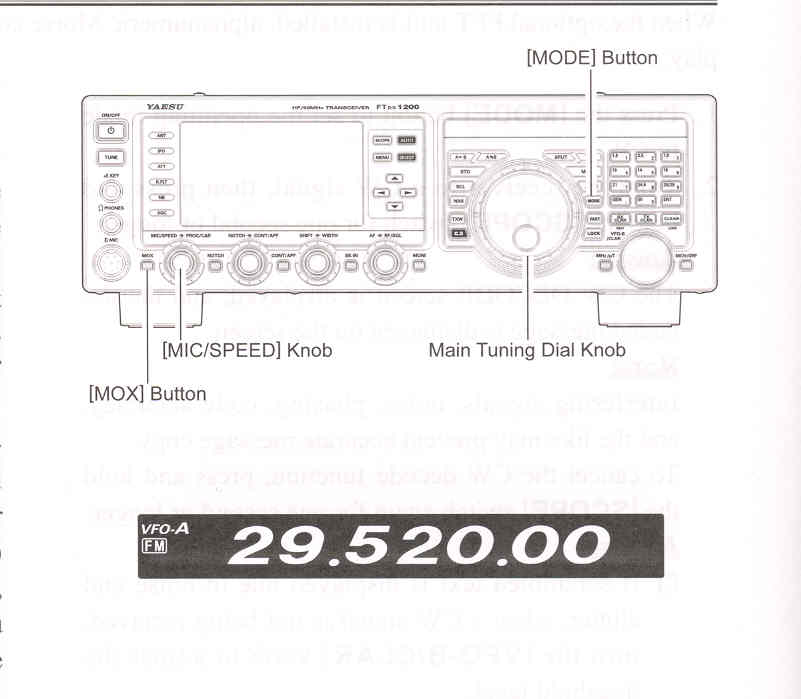
    1. Press the [MODE] button repeatedly, until the FM icon appears in the display, to select the FM operation mode.

    2. Rotate the Main Tuning Dial knob to select the desired operating frequency. Pressing the microphone [UP] or [DWN] buttons will cause frequency change in 5 kHz steps.

    3. Press the microphone PTT switch (or press the front panel [MOX] button) to transmit. Speak into the microphone in a normal voice level. Release the PTT or [MOX] switch to return to receive.

    4. Adjustment of the microphone gain may be accomplished in two ways. At the factory, a default level has been programmed that should be satisfactory for most situations. However, using Menu item "085 FM MIC GAIN", you may set a differnt fixed value, or choose the "MCVR" option which then lets you use the front panel [MIC/SPEED] knob to set the microphone gain in the FM mode.

ADVICE:

You may change the tuning step of the Main Tuning Dial knob via Menu item "153 AM/FM DIAL STEP".

You may change the tuning step of the microphone [UP]/[DWN] button via the Menu item "157 FM CH STEP".

The Transmit Monitor is another helpful way to verify proper adjustment of the FM MIC Gain. By pressing the [MONI] button, you will be able to hear the differences in deviation as you make adjustments.

FM is only used in the 28 MHz and 50 MHz Amateur bands covered by the FTDX1200. Please do not use FM on any other bands.


End of "Basic Operation"

Cont'd Next Page "FM Mode Operation"

Previous Page    Index of Topics    Table of Contents    Back to Top    Index of Pages    Next Page

Page 90 FTDX1200 Operating Manual